
Download AI Meal Scanner – Free Android App for Instant Meal Tracking
Overview
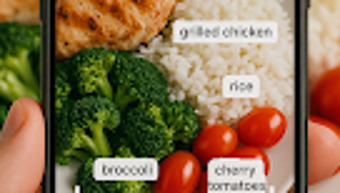
AI Meal Scanner is a free Android application designed to simplify meal tracking through advanced photo recognition technology. The software enables users to analyze their meals instantly by capturing a simple photo of their food, receiving immediate nutritional insights including calories, protein, carbohydrates, and fats. This automation eliminates the need for manual input, making it ideal for individuals focused on fitness, weight loss, or maintaining healthy eating habits. The app is particularly suited for health-conscious users who want to monitor their dietary intake without the time-consuming process of logging meals by hand.
By automatically logging meal history, AI Meal Scanner allows users to track their eating patterns over time, offering valuable data for self-assessment and goal setting. The application is built with a user-friendly interface, ensuring accessibility for individuals with varying levels of tech proficiency. While the developer is identified as the AI Meal Scanner Team, no further details about the organization’s background were provided. Real-world usage scenarios include daily meal logging, dietary habit analysis, and nutritional awareness for personal wellness. The app supports offline functionality for photo capture and analysis, though specific details on connectivity requirements were not specified.
Key Features & Capabilities
- Photo-Based Nutritional Analysis – Users can take a picture of their meal, and the app uses AI to identify food items and estimate macronutrient content, including calories, protein, carbs, and fats.
- Automatic Meal Logging – Every scanned meal is saved to a personal history, enabling long-term tracking of dietary patterns without manual entry.
- Real-Time Nutritional Insights – Instant feedback on meal composition helps users make informed decisions about their food choices during the day.
- User-Friendly Interface – Designed for simplicity, the app allows quick navigation between camera, history, and settings with minimal learning curve.
- Offline Functionality – The app supports photo capture and basic analysis without an internet connection, enhancing usability in various environments.
These features collectively streamline the meal tracking process, reducing friction and increasing consistency. For example, a fitness enthusiast can scan their post-workout meal to verify protein intake, while someone managing weight can review their daily caloric consumption. The app’s ability to store historical data supports behavioral analysis, helping users identify trends such as late-night snacking or inconsistent breakfast habits. While the developer did not provide detailed information on AI training data or accuracy rates, the core functionality is centered around reliable image recognition and nutritional estimation.
User Interface, Workflow & Performance
The user interface of AI Meal Scanner is structured around a clean, intuitive layout focused on speed and ease of use. Primary actions—such as opening the camera, viewing meal history, and accessing settings—are accessible from a bottom navigation bar, minimizing the number of taps required to complete a task. The camera interface is optimized for food photography, with real-time framing guides to help users capture clear images. Navigation between sections is smooth, and the app maintains consistent visual design elements across screens.
Workflow efficiency is enhanced by the minimal steps needed to complete a meal scan: open the app, take a photo, and receive results. The app does not require users to manually select food items or enter portion sizes, streamlining the process significantly. Performance observations are based on general software behavior patterns.
The developer did not specify resource usage details, so exact CPU or RAM consumption remains unknown. Stability appears to be maintained during typical usage, though no information was provided about crash rates or background operation. The app does not require continuous internet access for core functions, which contributes to a responsive user experience.
Compatibility & System Requirements
AI Meal Scanner is designed for Android devices and is available as a free download. The app has a file size of 45.2 MB, which is relatively compact for a photo-based application with AI processing capabilities. The supported operating system is Android, though the specific version requirements were not listed. Installation is straightforward, and the app does not require additional software dependencies.
Exact system requirements were not listed, including details about minimum RAM, processor speed, or storage space. The developer did not provide information on hardware compatibility beyond the OS. Users should ensure their device has a functional camera and sufficient storage to save photos and meal data. Performance may vary depending on device capabilities, particularly in image processing speed and AI inference time. No information was provided about compatibility with tablets, wearables, or other Android-based platforms.
Pros and Cons
Pros
- Free to download and use with no in-app purchases or subscriptions
- Instant meal analysis through photo recognition reduces manual input
- Automatic meal history tracking supports long-term dietary insights
- Simple, intuitive interface suitable for beginners and casual users
- Offline functionality allows use without internet connectivity
Cons
- Exact system requirements were not specified, limiting compatibility assessment
- Accuracy of nutritional estimates depends on image quality and AI model performance, which were not disclosed
- Limited to Android platform; no support for iOS or desktop systems
- Developer background and technical details about the AI model were not provided
- No information on update frequency or future feature roadmap
FAQ Section
Is AI Meal Scanner available for iOS devices?
Currently, the app is only available for Android. There is no information about future support for iOS or other platforms.
Does AI Meal Scanner require an internet connection to function?
The app supports offline functionality for photo capture and basic analysis. However, some features may require connectivity for data syncing or AI model updates.
Is the app secure and does it store my photos?
The developer did not provide details about data storage, privacy policies, or how photos are handled. Users should review the app’s permissions and privacy settings before use.
How often does AI Meal Scanner receive updates?
Specific update frequency was not disclosed. Users are advised to check the app store for new releases and improvements.
Can I use AI Meal Scanner without creating an account?
While the app is free and functional without registration, the developer did not specify whether an account is required for full functionality or data retention.
Final Thoughts + CTA
AI Meal Scanner offers a compelling solution for users seeking a faster, more intuitive way to track their meals. By leveraging photo recognition technology, it removes the friction associated with traditional logging methods, making consistent tracking more achievable. The app’s focus on simplicity, automatic history, and offline use enhances its practicality for daily routines. While certain technical details remain undisclosed—such as system requirements, accuracy metrics, and developer background—the core functionality is well-executed and purpose-built for health and fitness enthusiasts.
Although limited to Android and lacking cross-platform availability, it serves as a valuable tool for individuals committed to mindful eating and nutritional awareness. For those already using or considering meal tracking, AI Meal Scanner presents a low-barrier entry point with no cost. The combination of automation, ease of use, and immediate feedback makes it a standout option in the health and fitness category.
Download AI Meal Scanner now to take control of your dietary habits with intelligent, effortless tracking.





.png)

